Hey Composers 👋, if you’ve built a complex UI in Jetpack Compose, you’ve probably reached for BoxWithConstraints. And by doing so, you’ve probably paid a performance tax you didn’t fully understand.
SubcomposeLayout (the engine powering BoxWithConstraints, LazyColumn, and complex custom layouts) is a blunt instrument that breaks the fundamental rules of the Compose pipeline.
There’s a popular piece of advice floating around: “SubcomposeLayout is expensive, avoid it.” But why is it expensive? What exactly happens under the hood when you subcompose? In this post, we’ll look directly at the AOSP source code to understand what subcomposition really does, why it stalls the layout pipeline, and where the real cost comes from.
Before you write a
SubcomposeLayout, ask yourself:
- Need child A's size to measure child B? → Use a standard
LayoutorLookaheadScope. - Need parent constraints to change the size or position logic? → Use a standard custom
Layout. - Need parent constraints to dictate if a Composable is even emitted? → Use
SubcomposeLayout.
A quick refresher: composition then layout
In a standard Compose layout, there’s a clean separation of phases. First, composition fully constructs the tree of LayoutNodes by running your @Composable functions. Then, layout (measure + place) figures out the size and position of every node. Finally, draw paints them.
flowchart TD
    A([Composition]) -->|⚠️ SubcomposeLayout violates this| B([Layout: Measure + Place])
B --> C([Draw])| Aspect | Regular Layout | SubcomposeLayout |
|---|---|---|
| When children compose | Before measure | During measure |
| Compositions involved | Shares parent | One per slotId |
| Cost paid in measure pass | Measurement only | Composition + measurement |
| Best for | Most layouts | Constraint-dependent content |
The key rule here is: composition happens before layout. You can’t decide which composables to emit based on a measured size, because by the time you’re measuring, composition is already done.
But what if you genuinely need to? What if a child’s content depends on the constraints handed down by the parent? That’s exactly the problem SubcomposeLayout was built to solve.
The “What”: composing during the layout pass
SubcomposeLayout does something that sounds almost contradictory: it lets you run composition inside the measure or layout (placement) pass.
Think of a standard Layout as a restaurant kitchen with a prix fixe menu. You order everything upfront (Composition), and then the chef plates it all at once (Layout). SubcomposeLayout is like stopping the entire kitchen mid-plating, walking back to the stove, and cooking a brand new side dish because you realized the plate had extra room. It stalls the pipeline.
Instead of composing all children up front, you get a subcompose function that you call during measurement, once you already know the incoming constraints.
Here’s the canonical example everyone meets first, BoxWithConstraints, which is itself built on SubcomposeLayout:
@Composable
fun ResponsiveContent() {
    BoxWithConstraints {
        // We now know the constraints BEFORE deciding what to compose.
        if (maxWidth < 600.dp) {
            CompactLayout()
        } else {
            ExpandedLayout()
        }
    }
}ResponsiveContent.kt
The mechanism here is that CompactLayout() and ExpandedLayout() are not composed until the box has been measured. The decision is deferred to the layout phase.
The lower-level API looks like this:
@Composable
fun MySubcomposeLayout() {
    SubcomposeLayout { constraints ->
        // `subcompose` runs composition for the given slotId NOW,
        // during the measure pass, and returns measurables.
        val measurables = subcompose(slotId = "content") {
            // 🚨 CRITICAL: Check for infinite constraints before passing them down!
            // If this layout is inside a LazyColumn, constraints.maxWidth will be Infinity.
            // If you return an infinite dimension from the layout() block, or if a child
            // attempts to fill unbounded width, the framework will crash.
            val widthPx = if (constraints.hasBoundedWidth) constraints.maxWidth else 0
            val widthDp = with(LocalDensity.current) { widthPx.toDp() }
            MyContent(availableWidth = widthDp)
        }

        val placeables = measurables.map { it.measure(constraints) }

        // Protect against exceeding constraints if we have multiple children
        val width = (placeables.maxOfOrNull { it.width } ?: 0).coerceAtMost(constraints.maxWidth)
        val height = placeables.sumOf { it.height }.coerceAtMost(constraints.maxHeight)

        layout(width, height) {
            var y = 0
            placeables.forEach { placeable ->
                // Always use placeRelative to respect RTL!
                // Using x = 10 to demonstrate RTL placement (mirrored in RTL mode)
                placeable.placeRelative(10, y)
                y += placeable.height
            }
        }
    }
}MySubcomposeLayout.ktLayout receives already-composed children as measurables. A SubcomposeLayout receives a lambda and decides when (and whether) to turn it into measurables by calling subcompose during measurement.
The “Right” Way: A Real-World Use Case
If SubcomposeLayout is so dangerous, when should you actually use it?
The golden rule is: Use it when the emission of nodes depends on the measurement of previous nodes.
Let’s look at a real-world example. Imagine you are building a DynamicChipRow. You have a list of 20 tags. You want to display as many as will fit horizontally on one line. If they don’t all fit, you want to show a custom +X more chip at the very end.
If you try to build this with a standard Layout, you hit a wall. In a standard Layout, you have to compose all 20 chips upfront just to measure them. Worse, you haven’t composed the +X more chip because you didn’t know you needed it yet!
Here is where SubcomposeLayout shines. You can measure chips one by one, and dynamically subcompose the overflow chip only when you run out of space:
@Composable
fun DynamicChipRow(
    items: List<String>,
    itemContent: @Composable (String) -> Unit,
    overflowContent: @Composable (Int) -> Unit
) {
    SubcomposeLayout { constraints ->
        var xPosition = 0
        val placeables = mutableListOf<Placeable>()
        var itemsPlaced = 0

        // 1. We subcompose and measure items one by one in a loop
        for (i in items.indices) {
            val measurables = subcompose("item_$i") { itemContent(items[i]) }
            val placeable = measurables.first().measure(constraints)

            if (xPosition + placeable.width > constraints.maxWidth) {
                // 2. OUT OF SPACE! We stop composing regular items.
                break
            }

            placeables.add(placeable)
            xPosition += placeable.width
            itemsPlaced++
        }

        // 3. Do we have leftover items? Subcompose the overflow indicator!
        val remaining = items.size - itemsPlaced
        if (remaining > 0) {
            // We ONLY compose the overflow chip if we actually need it
            val overflowMeasurables = subcompose("overflow") { overflowContent(remaining) }
            val overflowPlaceable = overflowMeasurables.first().measure(constraints)

            // (In a production app, you'd calculate if the overflow chip itself fits here)
            placeables.add(overflowPlaceable)
        }

        // 4. Place everything
        layout(constraints.maxWidth, placeables.maxOfOrNull { it.height } ?: 0) {
            var x = 0
            placeables.forEach { placeable ->
                placeable.placeRelative(x, 0)
                x += placeable.width
            }
        }
    }
}DynamicChipRow.kt
Notice the power here? If only 3 chips fit on the screen, we never paid the composition cost for the remaining 17 chips. We stopped the kitchen mid-plating, realized we needed an overflow chip, went back to the stove to compose it, and then finished the layout. This is what the API was built for.
Here is how you would use this component in your code:
DynamicChipRow(
    items = listOf("Cheese", "Paneer", "Milk", "Curd", "Ice cream", "Kulfi", "Rose Milk", "Butter Milk", "Milkshake"),
    itemContent = { Button({}) { Text(it) } },
    overflowContent = { TextButton({}) { Text("+$it") } }
)
And here is how it renders on the device:
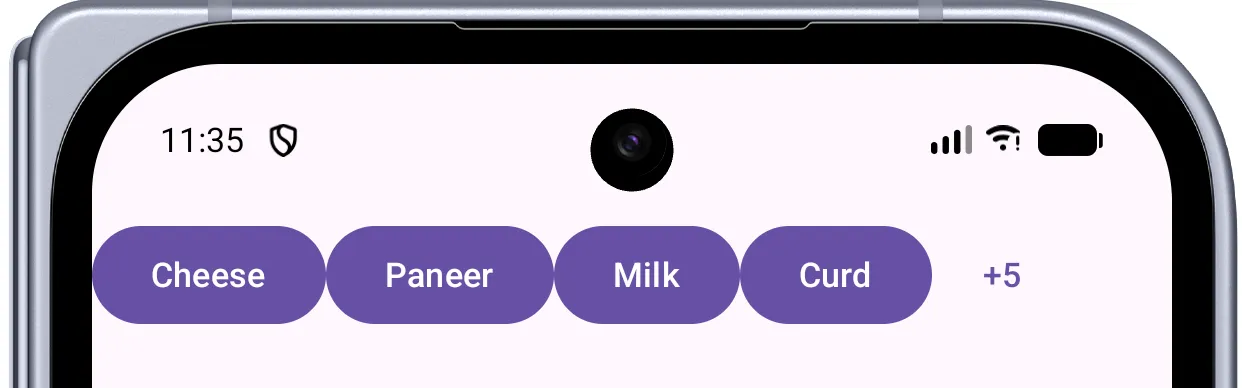
Looking at this example, we pass in 9 items. But as you can see, maybe only “Cheese”, “Paneer”, “Milk”, and “Curd” actually fit horizontally on the screen. Because of SubcomposeLayout, Compose never even executes the Button composition or measurement for “Ice cream”, “Kulfi”, and the rest of the list. By entirely skipping the composition and measurement of those unseen items, we avoid wasting CPU and memory resources, directly improving frame rendering performance.
How it works: the core machinery
By looking at the SubcomposeLayout source, we can see that the real workhorse isn’t the public composable at all, it’s an internal state holder called LayoutNodeSubcompositionsState.
The SubcomposeLayout composable mostly wires up three things:
- A
SubcomposeLayoutState, which owns theLayoutNodeSubcompositionsState. - The root
LayoutNodethat will host all the subcomposed children. - A measure policy that gives you the
subcompose { }function inside theSubcomposeMeasureScope.
// Simplified shape of the internal state holder
internal class LayoutNodeSubcompositionsState(
    private val root: LayoutNode,
    private var slotReusePolicy: SubcomposeSlotReusePolicy,
) {
    // Even the bookkeeping is allocation-optimized with ScatterMap
    private val nodeToNodeState = mutableScatterMapOf<LayoutNode, NodeState>()
    private val slotIdToNode = mutableScatterMapOf<Any?, LayoutNode>()

    // Each slotId gets its OWN child composition.
    fun subcompose(slotId: Any?, content: @Composable () -> Unit): List<Measurable> {
        // ...
    }
}
Two things in that snippet are the whole story of why subcomposition costs what it does:
- Each
slotIdmaps to its ownLayoutNode, and - each of those nodes gets its own child
Compositionthat is a sub-composition of the parent.
Each slot is its own little composition
When you call subcompose(slotId, content), the state holder:
- Finds (or creates) a
LayoutNodefor thatslotId. - Finds (or creates) a child
Compositionfor that node, parented to the enclosing composition context. - Calls
composition.setContent(content)to actually run your composable. - Returns the node’s children as a
List<Measurable>so you can measure them.
// Conceptually, inside subcompose(...)
private fun subcompose(node: LayoutNode, content: @Composable () -> Unit) {
    val nodeState = nodeToNodeState.getOrPut(node) { NodeState(...) }

    nodeState.content = content
    subcomposeInto(node) {
        // Runs composition for just this slot's content,
        // creating a child composition under the parent's context.
        // It uses createPausableSubcomposition or createSubcomposition based on state.
        composition = reuseOrCreateComposition(existing, node, ...)

        // Wrapping in withoutReadObservation ensures that measure-time
        // composition doesn't register phantom snapshot-read dependencies on the parent.
        Snapshot.withoutReadObservation {
            composition.setContent(content)
        }
    }
}
Subcomposition is real composition. It runs the composer, allocates slot tables, processes remembers, registers RememberObservers and SideEffects, the full machinery. It’s not a cheap “layout-only” shortcut. The cost is the cost of composing those composables, just shifted into the measure pass.
If you’re wondering how parent recomposition propagates into child subcompositions, SubcomposeLayout achieves this by executing a SideEffect { state.forceRecomposeChildren() } in its public composable.
flowchart TD
    A([SubcomposeLayout measure pass]) --> B{For each slotId}
    B --> C{Already composed & valid?}
    C -->|Yes| D[Active Reuse: same slotId already active this pass]
    C -->|No| E[Find or create LayoutNode]
    E --> F[Find or create child Composition]
    F --> G[composition.setContent]
    G --> H[Run composer: remember, effects, emit nodes]
    H --> I[Return children as Measurables]
    D --> J[measure + place]
    I --> J
The real cost, broken down
So where does the “SubcomposeLayout is expensive” reputation actually come from? Here is what is actually happening in the frame budget.
1. Composition runs during measurement
In a normal layout, composition is already finished before measuring begins, so the measure pass is pure math on already-built nodes. With SubcomposeLayout, the first time a slot is measured you pay for composition + measurement together, on the layout thread, inside the frame’s measure budget.
If your subcomposed content is heavy (lots of composables, expensive remember calculations, etc.), that work now competes with the time you have to measure and draw the current frame.
2. The per-frame subcompose tax
The real devil of subcomposition isn’t just the one-time layout overhead: it’s the per-frame tax.
What happens if you animate a parent’s size and read those continuously-changing constraints inside your subcompose block? It forces subcomposition every single frame. Because the constraints change, the content lambda is a new closure instance each measure pass. You aren’t just running math calculations; you are re-running composition — the composer, every remember, every invalidation check — on the reused node, 60 times a second.
BoxWithConstraints vs Modifier.layout
BoxWithConstraints isn’t the villain — reading a continuously-changing constraint inside it is. A breakpoint boolean (maxWidth < 600.dp) rarely flips, so it’s cheap. But a pixel-precise animating read causes a 60×/s composition tax.
Watch this drop frames on your own device:
val padding by animateDpAsState(targetValue = if (toggled) 32.dp else 0.dp)
BoxWithConstraints(Modifier.padding(padding)) {
    // Recomposes 60x a second during animation!
    MyHeavyContent(constraints.maxWidth)
}
The fix is ripping out BoxWithConstraints and using Modifier.layout to mathematically calculate the offset during the placement phase, completely bypassing the need to subcompose. This is the #1 way developers shoot themselves in the foot, causing massive UI jank.
3. Extra compositions = extra bookkeeping
Each slot owns a separate child Composition. Compositions aren’t free; they each maintain their own slot table and lifecycle. A SubcomposeLayout with many distinct slotIds is maintaining many child compositions, which means more memory and more work to keep them in sync, dispose them, and so on.
The escape hatch: slot reuse
The Compose team knew the per-slot composition cost would hurt in scrolling scenarios like LazyColumn (whose underlying LazyLayout primitive builds on SubcomposeLayout). So SubcomposeLayout ships with a powerful optimization: slot reuse, controlled by a SubcomposeSlotReusePolicy.
Instead of disposing a composition when a slot scrolls off-screen and rebuilding it from scratch when a new one scrolls in, the state holder keeps a small pool of deactivated compositions around and reuses them.
// Reuse keeps the underlying nodes & composition, but resets state,
// so a new slot can be "re-inflated" cheaply.
// `SubcomposeSlotReusePolicy(maxSlotsToRetainForReuse)` is a public factory that
// returns a policy retaining up to N deactivated slots in the reuse pool.
SubcomposeLayout(
    state = remember { SubcomposeLayoutState(SubcomposeSlotReusePolicy(maxSlotsToRetainForReuse = 7)) }
) { constraints ->
    // ...
}
Under the hood, this leans on ReusableComposition:
- When a slot is no longer needed, it isn’t immediately disposed. It’s moved to a reusable pool and deactivated (nodes kept, remembered state cleared).
- When a new slot of a compatible content type appears, the runtime grabs a deactivated composition and re-runs content into it. Reusing the existing node structure is dramatically cheaper than creating it fresh.
(Note: Lazy lists also utilize precompose() to prefetch items into a precomposeMap before they are even needed for measurement, further optimizing the reuse flow.)
flowchart TD
    A(["Measure Pass: subcompose(slotId)"]) --> B{"Is slotId in precomposeMap?"}
    B -->|Yes| C["Take from precomposed, return measurables"]
    B -->|No| D{"Reuse Pool: takeNodeFromReusables()?"}
    D -->|Yes| E["Pool re-activation: Re-activate Node & ReusableComposition"]
    D -->|No| F["Create fresh LayoutNode & Composition"]
    E --> G["Run Composer"]
    F --> G
    G --> H["Return Measurables"]
This is the exact same ReusableComposition foundation that newer features like PausableComposition build upon. Lazy lists use PausableComposition to chunk composition work across frames, ensuring that pre-composing upcoming items during idle time doesn’t blow past the 16ms frame deadline. Separately, an internal OutOfFrameExecutor is used to schedule the deactivation and disposal of compositions off the frame’s critical path, keeping your scroll smooth.
Practical takeaways
After all this digging, the advice “avoid SubcomposeLayout” becomes more nuanced and actionable:
- Don’t reach for it by default. If your children don’t actually need parent constraints to decide what to compose, a plain
Layout(orModifier-based approach) is cheaper and clearer. BoxWithConstraintsisSubcomposeLayout. It’s convenient, but it carries the same cost. If you only need the size for sizing/positioning (not for choosing content), prefer a customLayoutoronSizeChanged.- Keep subcomposed content lean. Whatever runs inside
subcomposeis composed during the measure pass; heavy work there is felt directly in your frame budget. - Lean on reuse for repeated slots. If you’re building list-like UIs, a sensible
SubcomposeSlotReusePolicyis what keeps the cost amortized. - Avoid invalidations that re-trigger subcomposition every frame. As shown above, animating constraints -> new content lambda ->
contentChanged-> recompose 60x/sec. UseModifier.layoutinstead.
”Asking for intrinsic measurements of SubcomposeLayout layouts is not supported”
- Need sibling sizing? DO NOT use
SubcomposeLayout. If you just want a child to be as tall as its sibling (like a divider next to text), useModifier.height(IntrinsicSize.Min). If you ask for intrinsic measurements of aSubcomposeLayout, the framework will literally throw theIllegalStateExceptionabove. It crashes because the layout doesn’t know what it contains until it measures!
”Key was already used” in LazyColumn
-
Free real-world insight: Have you ever seen the crash
"Key $slotId was already used. If you are using LazyColumn/Row please make sure you provide a unique key for each item"? Under the hood, when you subcompose the sameslotIdtwice in one measure pass, the second lookup returns a node already placed at an earlier index (itemIndex < currentIndex), and the internalrequirePreconditionfails. -
Prefer higher-level APIs when they exist. Often you don’t need to hand-write a
SubcomposeLayoutat all. Components likeBoxWithConstraintsandLazyColumn/LazyRowalready wrap subcomposition for you. Even for complex flow layouts with dynamic overflow indicators (like a “+3 more” chip), useFlowRoworFlowColumnwith theoverflowandmaxLinesoverloads. Reach for these built-in tools first and only drop down to a customSubcomposeLayoutwhen none of them fit. -
Keep an eye on newer layout tools (and how they interact!).
LookaheadScopelets Compose pre-measure a target layout so children can animate toward it. In Compose 1.7+,SubcomposeLayouthooks deeply into this viaApproachMeasureScopeImpl. The subcomposition lambda evaluates the “lookahead” target state, and then dynamically manages slots during the “approach pass” to animate smoothly toward that target. It’s highly optimized, but complex to author correctly.
Conclusion
Stop prematurely optimizing. If you are building a static screen, the subcomposition cost of a BoxWithConstraints is mostly irrelevant; a single frame-1 subcomposition cost is virtually unnoticeable. Don’t avoid it just because “Twitter said it’s slow.”
But when you move into scrolling lists or animating states, you must respect the pipeline.
The next time you build a custom layout, make a deliberate choice: do I truly need to emit nodes based on measurement, or am I about to pay for subcomposition when a plain Layout would do?
SubcomposeLayout is a chainsaw. It’s incredibly powerful when cutting down a tree (like building a responsive LazyColumn), but you don’t use a chainsaw to slice a tomato. Choose your layout tools wisely.
Let’s catch up on X or visit my site to know more about me 😎.